 Ordinami.it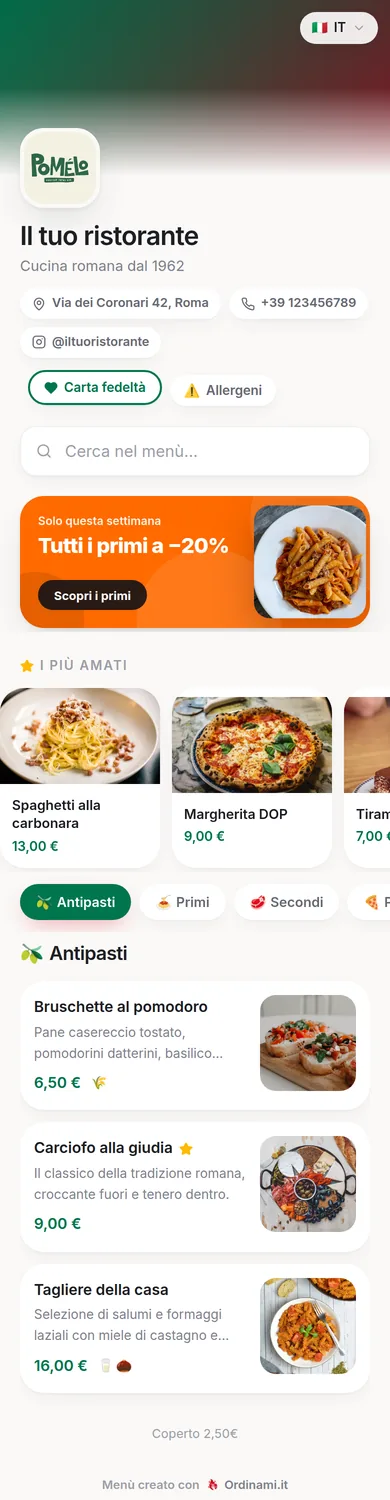
The QR code menu is the fastest and cheapest way to get your venue's menu onto your customers' phones: a code printed on the table, a scan with the camera, and the full menu opens in the browser. No app, no waiting, no reprints. Here you'll find how it really works, what it can do beyond showing the dishes, and how to adopt it without mistakes.
How scanning works, on the customer's side
The gesture is second nature by now to anyone with a smartphone: open the camera, point it at the code, tap the link that appears. No dedicated app is needed — QR readers have been built into every phone for years — and no sign-up either: the menu opens in the browser like a normal web page, in a couple of seconds.
From there the customer browses by category, looks at dish photos, reads descriptions and allergens and, if the venue has switched on languages, picks theirs with a tap. It's a better experience than the photographed PDF you still see around: a PDF is slow to load, forces you to zoom and is unreadable on a six-inch screen. The whole difference between a QR that works and one that annoys lies right here: behind the code there must be a page designed for the phone, not a scan of the paper menu.
Why customers happily use it
The initial wariness towards QR codes is history: today most customers use them without thinking, and quite a few prefer them to paper for concrete reasons. The menu on the phone can be browsed at leisure, without waiting for the waiter to bring the copies or for the next table to finish theirs; the photos help people choose, especially for dishes that don't come across in writing; allergens are clear without interrogating the staff; and tourists read everything in their own language, which is the single most appreciated improvement in tourist areas.
A share of customers still prefers paper, and it's right to accommodate them: two or three courtesy copies at the counter do the job, without the venue having to depend on the print shop for everything else. The QR isn't something imposed on customers: it's an extra option that the vast majority chooses on their own.
Static or dynamic QR: the difference that matters
There's a technical distinction that's worth real money. Free QR generators often produce static codes tied to fixed content: change the menu and the code is no longer valid, so you reprint everything. A professional QR code menu works the other way round: the code points to a stable address and the content lives on the platform. You update dishes and prices whenever you want, and the QR printed on your tables stays valid forever.
With Ordinami.it the QR is generated once and never changes: you can rebuild the menu from scratch every season without touching the table tents. This turns printing into a one-off expense of a few tens of euros and makes possible what was uneconomical with paper: the daily off-menu special, a different lunch and dinner list, the sold-out dish hidden mid-service. The full comparison with the traditional menu is explored on the digital menu page.
Beyond the menu: ordering from the table and languages
The same QR that shows the menu can do more, and this is where the investment changes category. With the Ordinami.it MEDIO plan the code becomes an ordering channel: the customer chooses on their phone and sends the order, without waiting for someone to come by and take it. The benefits are measured on the floor: no waiting to order, zero transcription errors, and the second round of drinks — the easiest margin of the evening — starting on its own while the staff bring out the dishes.
From the same code the menu speaks 6 languages: tourists pick theirs and read translated descriptions and allergens, with no separate menus to print and no waiters turned into interpreters. And on the full plans, loyalty card and review collection are added, all behind that single code on the table. The QR, in short, is the door: what you put behind it depends on how hard you want it to work.
Adopting it in a day: the concrete steps
Switching to a QR code menu isn't a project: it's an evening's work. You create your account, upload the menu with the guided process — categories, dishes, prices, photos, allergens — and download the automatically generated QR, ready for print. The next day you print a trial copy, test it on the worst-lit table with a couple of different phones, and if everything runs smoothly you order the final table tents.
For printing and placement, a few tried-and-tested rules apply: a code of at least 3x3 centimetres, a white margin around it, a laminated or rigid support, one QR per table plus one at the counter and one in the window for people who want to look at the menu before coming in. Detailed instructions on sizes, materials and placement — with the typical mistakes to avoid — are in the guide to the restaurant menu QR code.
Frequently asked questions
Do customers need to download an app to read the QR?
No: the phone camera is enough. The QR reader is built into every recent smartphone and the menu opens in the browser.
Does the QR code stop working if I change the menu?
No: with Ordinami.it the code always stays the same and points to the updated menu. Change dishes and prices as much as you like without reprinting anything.
What about customers who don't use a smartphone?
Keep two or three courtesy paper copies at the counter: the QR covers the vast majority of tables, paper handles the special cases.
Can customers also order from the QR, not just read the menu?
Yes: with the Ordinami.it MEDIO plan the customer sends orders from the table straight from their phone, from the same code as the menu.
How much does setting up a QR code menu cost?
The subscription starts at €29.90 a month, plus the one-off printing of the table tents: a few tens of euros, because the code never changes.