 Ordinami.it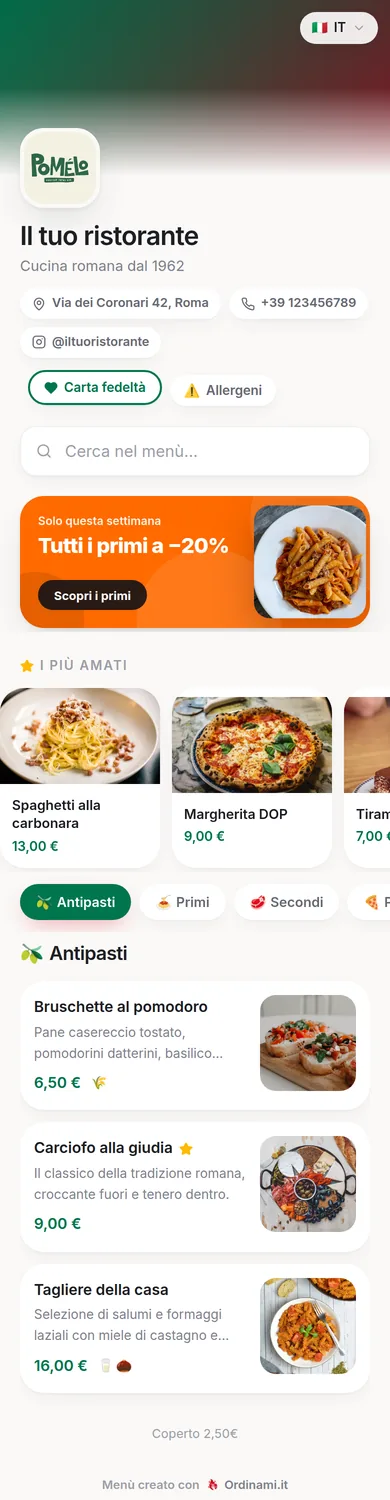
A digital menu is your venue's menu turned into a web page: the customer scans a QR code on the table and sees dishes, photos, prices and allergens, without downloading any app. You update it in real time from your dashboard, with no more reprints. On this page you'll find what it is, how it works and what it can do for restaurants, pizzerias and bars.
What a digital menu is, in plain words
A digital menu is a web page holding your venue's complete menu: categories, dishes, descriptions, prices, photos and allergens. Customers reach it by pointing their phone camera at a QR code — a gesture that's second nature to everyone by now — or from a link you can put on your Google Business Profile, on social media or in the booking confirmation message.
The real difference from paper isn't the screen: it's that the menu stops being a fixed object. Every change you make from the dashboard — an updated price, a sold-out dish to hide, today's off-menu special — is online that very instant, on every table. It isn't a PDF either: a photographed PDF is slow to load and impossible to browse on a phone, whereas a real digital menu is a page designed for the screen, with navigable categories and text you can read without zooming.
How the QR code menu works
It comes down to three steps. First: you create the menu once from the Ordinami.it dashboard, entering categories, dishes, prices, photos and allergens — the process is guided and needs no technical skills. Second: the system automatically generates your QR code, which you print and place on tables, at the counter and in the window. Third: the customer scans the code with their camera and the menu opens in the browser, with no app to download and no sign-up.
One important detail: the QR code never changes. When you update the menu, it's the page content that changes, not the code — so your printed table tents stay valid forever, even if you rebuild the menu from scratch every season. That's the difference between a dynamic QR managed by a platform and the free generators that create a new code with every edit, forcing you to reprint everything.
The concrete benefits for restaurant owners
The benefits restaurant owners mention most often after going digital are operational, not cosmetic:
- Real-time updates: prices, sold-out dishes and daily specials change from your phone in a minute, even mid-service.
- Zero reprint costs: no more trips to the printer at every price change, no more battered laminated menus to replace.
- Photos that sell: on paper, photos cost money; on screen they're free — and a well-photographed dish gets ordered more.
- Compliant allergen info: the mandatory allergen information required by EU Regulation 1169/2011 (the same EU/UK allergen rules) sits next to every dish, updated together with the recipe.
- Menu in 6 languages: tourists read in their own language and order with more confidence, without monopolising the waiter.
Add to these a less visible advantage: the menu becomes a communication channel you control, which you can link to Google, social media and delivery.
Digital menu or paper menu?
The right question isn't which of the two is better in absolute terms, but which works better for your venue. The paper menu has tradition and tactile pleasure on its side, and in certain settings — fine dining, the historic restaurant — it remains part of the scenery. But it pays for two structural limits: every change costs a reprint, and it can't offer photos, multiple languages or ordering from the table.
The digital menu wins on running costs, speed of updates and features, and for the vast majority of restaurants, pizzerias and bars it's now the more rational choice. The solution the most pragmatic venues adopt is a hybrid: QR as the main tool on every table, plus two or three courtesy paper copies for those who prefer them. That way no customer is left out and your dependence on the print shop ends.
Beyond the menu: orders, loyalty and statistics
Once the menu is digital, you can build features on top of it that paper will never have. With the more complete Ordinami.it plans, the menu becomes a sales and loyalty tool:
- Ordering from the table: the customer orders straight from their phone, from the same QR as the menu. Shorter waits, zero order-ticket errors, and a second round of drinks that starts on its own.
- Digital loyalty card: the customer collects points and rewards without cardboard stamp cards, and you finally see who your regulars are.
- Review collection: the invitation to review lands in the natural flow of a customer who already has their phone in hand.
- Statistics: the most-ordered dishes, peak hours, the data for menu engineering without piecing anything together from receipts.
You can start with the menu alone and switch on the rest when you need it, without changing platform or QR.
What it costs and how to get started
A professional digital menu costs about as much as one dinner for two a month: Ordinami.it plans start at €29.90 a month, and the full breakdown is on the digital menu pricing page. The subscription includes everything: the menu page, the QR code ready to print, unlimited updates and support. The only external cost is printing the table tents, a one-off expense of a few tens of euros.
Getting started needs no planning: you create your account, upload the first categories following the guided process — here's the step-by-step guide to creating a digital menu — and in one evening your menu is on your phone, ready to show colleagues and friends before you print the final QR. You don't have to throw the paper away the next day: the transition can be gradual, and the QR can live alongside the paper copies for as long as you like.
Frequently asked questions
What does the customer need to see the digital menu?
Just their phone: they point the camera at the QR code and the menu opens in the browser. No app to download, no sign-up.
Can I update the menu myself or do I need a technician?
You update it yourself from the dashboard, even from your phone: change prices, hide sold-out dishes and add new items in real time, with no technical skills.
Does the QR code change when I edit the menu?
No, the QR always stays the same: only the page content changes. Your printed table tents stay valid forever.
Is the digital menu compliant with allergen rules?
Yes: you can flag the 14 allergens required by EU Regulation 1169/2011 (and the equivalent UK rules) next to every dish, and the information stays aligned with every recipe change.
How much does a digital menu with Ordinami.it cost?
From €29.90 a month for the BASE plan; MEDIO at €49.90 adds ordering from the table and 6 languages, PRO at €69.90 also adds loyalty card, reviews and statistics.