 Ordinami.it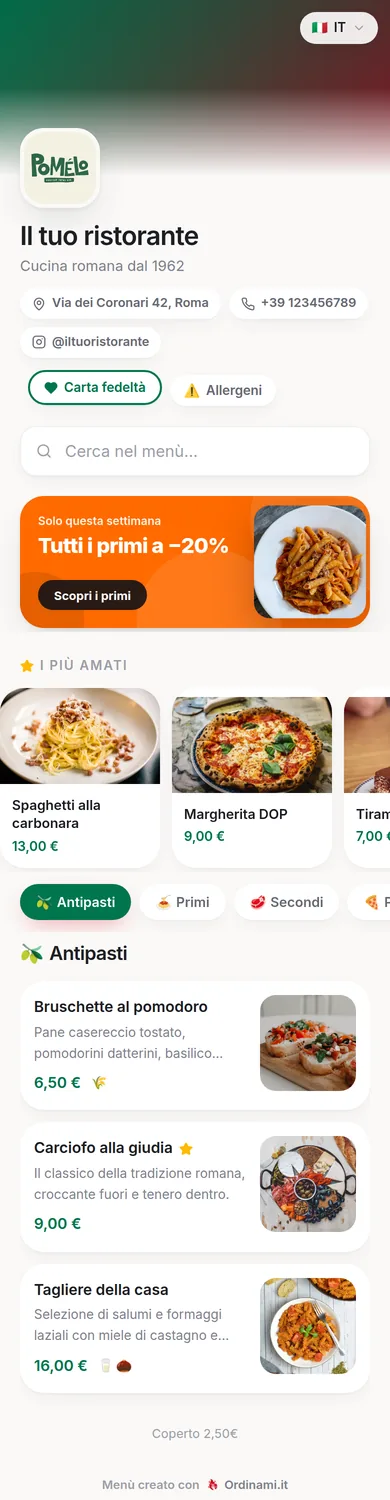
The menu is the salesperson that talks to every customer in your restaurant, at every service: a concrete share of your takings depends on how it's structured and written. This guide collects the rules that really work — structure, descriptions, prices — and the most common mistakes to avoid, with a final chapter on how to take it all digital.
The right structure for a restaurant menu
A good menu is first of all a clear structure: recognisable categories — starters, pasta, mains, sides, desserts — in the order the customer looks for them, with at most one special section for the dishes that define your venue. "Chef's specialities" that duplicate half the mains confuse rather than sell.
On the number of items, research and experience say the same thing: too much choice paralyses. A menu of 25 to 40 items in total can be read in a couple of minutes, signals fresh cooking and is easier to manage in terms of stock and waste too. Within each category, the order isn't neutral: the first two positions and the last are the most looked at, and they're the right spots for the dishes with your best margins. Visual hierarchy — a highlighted dish, a photo, a box — should be used sparingly: if you highlight everything, you've highlighted nothing.
Descriptions that make people order
Between "Sliced beef" and "Sliced Piedmont sirloin cooked pink, wild rocket and 24-month Grana" there's the same recipe but a very different perceived value. An effective description fits in one or two lines and answers three questions: what's in the dish, how it's prepared, what makes it yours.
The words that sell are concrete: origin (Bronte pistachio, Tropea red onion), technique (mantecato, slow-cooked at low temperature, smoked in-house), textures (crunchy, creamy, warm). The ones to cut are the adjectives that prove nothing: delicious, tasty, exquisite — if every dish is "an explosion of flavours", none of them is. Finally, watch the verifiable claims: "homemade" and "catch of the day" only get written if they're true. Today's customer asks, checks and, if they discover the trick, writes it in the reviews.
Prices: where to put them and how to write them
The way you present prices changes how the customer chooses. The most widespread mistake on restaurant menus is the column of prices lined up on the right with a row of dots: it turns the menu into a price list and invites comparing numbers and choosing the cheapest. The solution is to put the price at the end of the description, in the same body of text, with no dots.
The final digits communicate positioning: round prices for mid-range and upscale restaurants, .90 endings for value formats — what matters is consistency across the whole menu. And every category needs a premium dish to act as an anchor: few people order it, but its presence makes the mid-to-high-priced dishes look reasonable, and those are the ones you really want to sell. Prices should then be reviewed at least twice a year with your food cost to hand: small, frequent adjustments go unnoticed; the big annual hike ends up in the reviews.
The most common mistakes on restaurant menus
Working on menus, you always run into the same mistakes, and they're worth listing because each has a simple fix:
- The endless menu: eighty items that paralyse the customer and wear out the kitchen. Fix: cut what sells little and has the worst margin.
- Prices corrected in pen: they signal neglect and improvised price hikes. Fix: a menu you can update without reprints.
- Missing or outdated allergens: beyond the risk of fines, they force front-of-house to chase the kitchen at every question. EU Regulation 1169/2011 — and the equivalent UK rules — make them mandatory.
- Clumsy translations: a menu translated word for word makes tourists smile in the wrong way.
- Typos and internal abbreviations: the customer doesn't ask what they mean, they order something else.
The interesting thing is that more than half of these mistakes stem from the same constraint: paper costs money, so it doesn't get updated.
From the paper menu to the digital menu
The rules covered so far apply on any medium, but applying them on paper has a cost: every rewrite, price tweak or seasonal change means the print shop. That's why so many menus stay frozen for years despite good intentions. The digital menu removes that friction: descriptions you can rewrite whenever you want, prices updated in a minute, seasonal dishes that come and go with no reprints, allergens aligned with every recipe change.
With Ordinami.it the menu becomes a web page reachable from the QR on the table, with photos, six languages for tourists and, on the more complete plans, ordering from the table and statistics on the best-selling dishes — the data you need to actually apply menu engineering. If you're building the menu from scratch, the create a restaurant menu page walks you from choosing the items to publishing; if you want to try it right away, you can sign up and upload the first category tonight.
Frequently asked questions
How many items should a restaurant menu have?
Between 25 and 40 items in total for most venues: enough to choose from, not so many that the customer freezes and the kitchen and stockroom get overloaded.
Are allergens on the menu compulsory?
Yes: EU Regulation 1169/2011 (mirrored by UK rules) requires you to inform customers about the 14 allergens present in your dishes, in writing and precisely, off-menu specials included.
Where should the most profitable dishes go?
At the start and end of each category, which are the most-viewed positions, with a well-crafted description and possibly a photo.
Round prices or prices ending in .90?
It depends on positioning: round for mid-range and upscale venues, .90 for value formats. What counts is consistency across the whole menu.
How do I take my paper menu online?
With Ordinami.it you recreate the menu in the guided dashboard, the system generates the QR code to print on your tables, and from then on you update everything in real time.