 Ordinami.it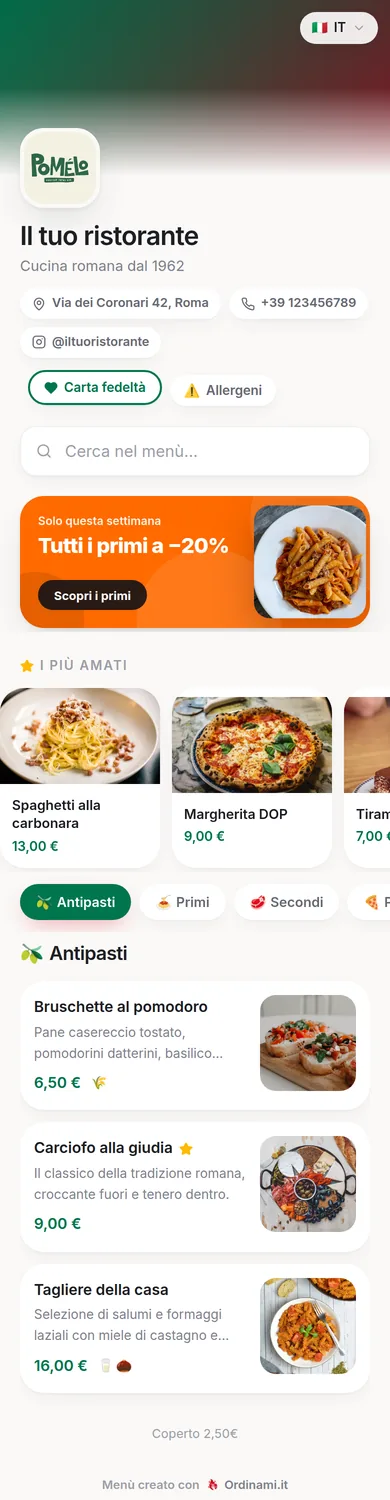
Creating a restaurant menu means making financial decisions disguised as culinary ones: which dishes to offer, at what price, in what order. This guide starts from scratch — useful both for those opening a new venue and for those who want to redo a tired menu — and goes all the way to publishing online with a QR code, so the result ends up on your customers' phones rather than at the printer's.
Where to start: identity and numbers
Before writing a single item, you need two clear answers. The first concerns identity: what kind of food you make, for whom, at what price point. The menu is the operational translation of your concept, and "a bit of everything for everyone" is the premise of the endless menus that don't work. The second concerns numbers: for every candidate dish you need to know the food cost, i.e. the cost of the ingredients in one portion at real purchase prices, trimmings and waste included.
With these two elements you can apply the double filter that sets professional menus apart: every dish must make sense for the venue's positioning and stand up financially. The beautiful dish with 55% food cost and three cheaper competitors is a passion to keep off the menu, or to save for weekend specials. It's desk work, with a calculator: doing it beforehand saves doing it later, in front of customers.
Choosing the dishes: how many and which ones
The most useful rule for a new menu is: short at the start. Between 25 and 40 items in total, spread across categories of at most 10-12 dishes, composed along these lines:
- Signature dishes: three or four dishes the venue wants to be remembered and chosen for. They're the reason people talk about you.
- Volume dishes: the classics customers expect and order in quantity. They earn less margin but fill the room.
- Margin dishes: items with low food cost and high perceived value, to be positioned well and described even better.
- Coverage: at least one vegetarian option and one light one, so you don't lose the groups where a single excluded diner moves everyone elsewhere.
Expanding a short menu that works is easy and you do it on sales data; shortening a long menu in front of loyal customers is far more painful. When in doubt, cut.
Writing it well: names, descriptions, prices
With the list of dishes decided, the menu has to be written — and this is where a concrete part of the average spend is won or lost. Names must be clear, with no internal abbreviations; for traditional dishes the Italian name stays even in the translations. Descriptions fit in one or two lines and use concrete words: ingredient origin, preparation technique, textures. No "delicious" and "tasty", which prove nothing.
On prices, three quick rules: never the lined-up column with dots, which pushes people to pick the lowest number; the figure at the end of the description; endings consistent with positioning (round for mid-range and upscale, .90 for value formats). And in every category an anchor: the premium dish that few order but that makes everything else look reasonable. For the full deep-dive on structure and typical mistakes, see the restaurant menu guide.
Paper or digital? Why it pays to be born online
A newly created menu is by definition a menu to be corrected: in the first few months you'll discover dishes that don't move, prices to adjust, descriptions that don't work. If the menu is printed, every correction costs a reprint — so it doesn't get done, or gets done in pen in front of customers. If the menu is born digital, every correction is a minute on the dashboard, and the menu improves week after week without friction.
Being born online brings the rest with it too: allergens under EU/UK rules set per dish from the start, photos added as the dishes come off the pass, six languages for tourists, the menu link to put on your Google Business Profile and social media even before opening day. Paper can remain as a courtesy copy, printed once the menu has settled: it's the reverse of the traditional order, and it's the right one.
Publishing it online with Ordinami.it
Going online is the quickest part of the whole journey. On Ordinami.it you create your account, enter categories and dishes with descriptions, prices, photos and allergens following the guided process, and the system generates the QR code to print on your tables: the complete hands-on guide, step by step, is on the create a digital menu page. For a menu of 30-40 items prepared as described here, uploading takes a couple of hours.
From that moment the menu is a living tool: today's off-menu special gets added in thirty seconds, the sold-out dish gets hidden from your phone, the seasonal change is prepared in advance and switched on the right day. And with the more complete plans the menu also collects orders from the table and gives you statistics on what really sells: the data with which, three months from now, you'll do the first serious review of the menu you're creating today.
Frequently asked questions
How many dishes should a new restaurant's menu have?
Better to start short: 25-40 items in total. Expanding a menu that works is easy; shortening a long one in front of customers is much harder.
How do you price a dish?
Start from the food cost (ingredient cost of one portion, waste included), apply a multiplier between 3 and 4, and adjust by looking at the market and the margin in euros.
Should I create the paper menu or the digital one first?
Digital: in the first few months the menu changes constantly, and online you correct everything without reprints. Paper gets printed later, once the menu has settled.
Can I create the menu before the venue opens?
Yes, and it's advisable: you prepare it calmly, have friends test it on their phones, and reach opening day with QR and translations already in place.
Does a menu created with Ordinami.it include allergens?
Yes: for each dish you select the allergens from a predefined list based on EU Regulation 1169/2011 (the same as UK rules), visible in the translated versions too.