 Ordinami.it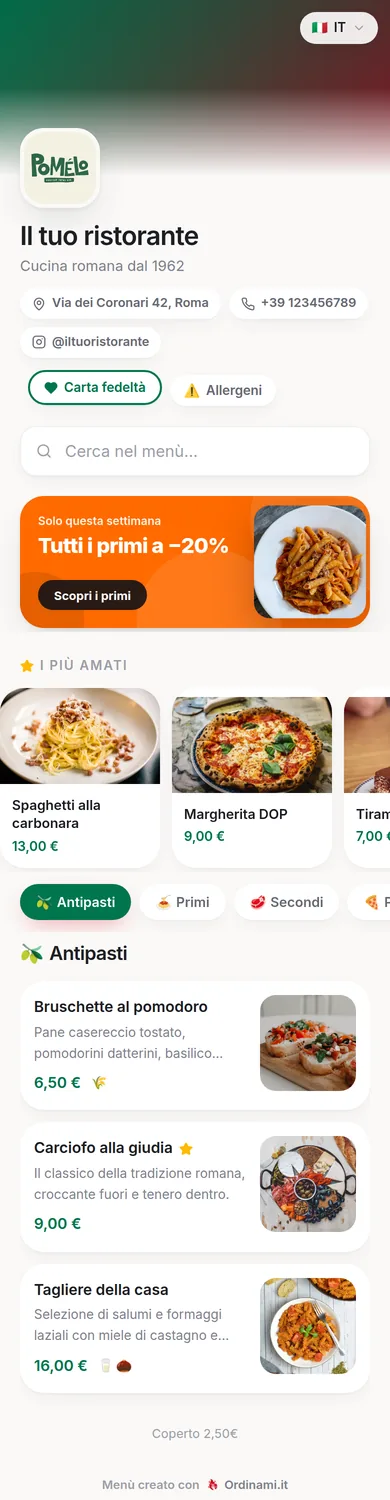
The reason so many venues keep putting off the digital menu is always the same: "who is going to retype that whole menu?". With Ordinami.it the answer is: nobody. You take a photo of the paper menu — or upload the PDF — and artificial intelligence recognises the categories, dishes, prices and even the descriptions on its own. In under a minute the proposal is ready; you review it, fix what needs fixing and import. A hundred-item menu goes digital in a coffee break.
How AI import works
In the Menu section of your dashboard there is an "Import with AI" button. From there, two routes: take a photo of the paper menu straight from your phone, or upload a file — JPG, PNG or PDF up to 8 MB. The AI reads the document, works out where one category ends and the next begins, separates the dish name from the price and the ingredients, cleans up dot leaders and abbreviations.
The result is not published blindly: a review screen appears with every item found, each with its own checkbox. Fix a name, adjust a price, drop the item you don't want — and only then import. Categories that already exist in your menu are recognised and reused, duplicate dishes are discarded automatically.
Long menus, handwritten, across several pages
The system is built for real menus, not lab specimens. A multi-page menu is imported one photo at a time: on each pass the existing categories grow richer without creating duplicates. The best photos are straight and well lit — the same care you would take to send one on WhatsApp — but the AI copes with two-column layouts, prices lined up with dot leaders and names in capitals, which are rewritten cleanly.
After the import only the fun parts are left: adding photos to your best dishes, setting up the dish pages with videos, switching on the languages. The translations into 6 languages start automatically on freshly imported dishes.
How much time (and how many mistakes) you save
Retyping a menu of 80-150 items by hand means an afternoon's work and, almost always, a few typos: a wrong price, a forgotten dish, a category out of place. AI import flips the proportion: the machine does 95% of the work in under a minute, and you are left with the 5% — the review — which is also the only step where a restaurateur's eye is genuinely needed.
There is a less obvious benefit too: the barrier to entry disappears. The digital menu is no longer "a project for January", it is something you do this afternoon, between one service and the next. And since the 15-day trial is free and complete, you can import your menu and see it on your phone before you even choose a plan.
What happens after the import
The imported menu is a fully fledged Ordinami.it menu: a QR code ready to print, unlimited real-time edits, allergens to tick dish by dish, and a look you can customise with colours, fonts and backgrounds. From the MEDIO plan you add table ordering, commission-free takeaway and the kitchen display.
And every published venue gets its own indexable mini-site with a preview of the menu: the photo you took of your paper menu becomes, within the hour, a complete online presence.
Frequently asked questions
How do you create a digital menu with artificial intelligence?
With Ordinami.it you photograph the paper menu (or upload the PDF) from the dashboard: the AI recognises categories, dishes, prices and descriptions and proposes the import. You review everything with checkboxes, fix what needs fixing and confirm.
Can the AI misread the menu?
It can happen with crooked or hard-to-read photos: that is why there is always a review step before import, where every name and price can be corrected or excluded. Nothing is published without your go-ahead.
Does it work with PDFs too?
Yes: you can upload a PDF up to 8 MB as well as JPG and PNG photos. Multi-page menus are imported one page at a time, without creating duplicates.
How much does AI import cost?
It is included in every Ordinami.it plan, and it is available in the 15-day free trial too: you import the menu with no credit card and, when the trial ends, pick a plan to keep using the dashboard and the menu.
Can I edit the dishes after the import?
Of course: the imported menu is edited like any Ordinami.it menu — photos, descriptions, allergens, variants, prices — with instant updates and a QR code that never changes.